Best i18n libraries for React, React Native & Next.js (2026)

React 19 and the App Router changed the rules. With React Server Components (RSC) now the default pattern in Next.js, the question is no longer just "which i18n library has the best API" but "which libraries actually work in Server Components without forcing everything into use client"?
2024 was the turning point: the industry shifted from "client-side first" to "server-side first" with React Server Components becoming the default in Next.js. Libraries that relied entirely on client-side context and hooks (like react-translate, last updated in 2016) were effectively deprecated overnight, and a new generation of RSC-native libraries began pulling ahead. React 19 accelerated this further with the use() hook, which simplifies async data loading, including translation files, by replacing older patterns like useEffect + useState for fetching translations at runtime.
The answer narrows the field significantly. Libraries built around React context and client-side hooks need wrapping, workarounds, or a recent rewrite to function correctly in an RSC environment. A few libraries were designed with this constraint in mind from the start, and they are pulling ahead in adoption.
This post covers the full landscape: the established giants that are still the right choice for many teams, the new wave of compiler-based and RSC-native libraries gaining ground in 2026, and what to look for when making the decision for a new project.
For the architectural decisions that come before library selection, like key naming conventions, file formats, fallback strategies, and CI/CD integration, see our technical guide to internationalization and software localization.
Access our full list of localization libraries and tools on GitHub. You are welcome to add your resources as a pull requests or just create a new issue.
Quick verdict: Which library should you pick?
Overview of the best React localization libraries in 2026, with a focus on RSC compatibility, bundle size, and type safety.
| Library | Best for | RSC ready | Bundle size (minified & gzipped) | Type safety |
|---|---|---|---|---|
| next-intl | Next.js App Router | Yes | ~4 KB (457 B server-only) | Full key autocompletion |
| react-i18next | Flexibility across any React setup | With wrappers | ~9kB | Good |
| LinguiJS | Compile-time performance | Yes | ~3kB | Excellent |
| Paraglide-JS | Minimum bundle, tree-shaking | Yes | ~1kB per locale | Full |
| react-intl (FormatJS) | Enterprise ICU formatting | With use client | ~20kB+ | Good |
| typesafe-i18n | Strict TypeScript, codegen | Yes | ~1kB + codegen | Best-in-class |
| next-i18next | Next.js Pages Router (SSR) | Pages Router only | ~658B | Good |
| next-translate | Lightweight Pages Router apps | Pages Router only | ~392B | Partial |
| zero-intl | Minimal modern apps | Yes | ~2kB | Good |
| Tolgee | All-in-one with in-context editing | Yes | ~10kB | Good |
| Intlayer | AI-native, automatic key discovery | Yes | ~5kB | Good |
The new wave: Performance-first and RSC-native
Libraries built with React Server Components in mind from the start are gaining traction in 2026. They focus on minimal runtime, static extraction, and seamless server/client usage without the need for use client wrappers.
next-intl
The de facto standard for Next.js App Router

If you are starting a new Next.js project in 2026, next-intl is the most complete answer. It was built with RSC in mind from version 3 onward and works natively in both Server and Client Components without wrapping everything in a provider.
It handles the full stack of modern Next.js i18n concerns: server-side locale resolution in middleware, statically typed translation keys, ICU message formatting, localized routing with Link and useRouter, and hreflang tag injection for SEO.
// Server Component: no 'use client' required
import { getTranslations } from 'next-intl/server';

export default async function BookingPage() {
  const t = await getTranslations('booking');
  return <h1>{t('title')}</h1>;
}
With ahead-of-time compilation (introduced in 2026), next-intl can drop its runtime significantly. The bundle cost is now ~4kB for apps with client-side translations and as low as 457B for server-only usage, making it one of the most competitive options by size. The library also offers excellent type safety with autocompletion for translation keys out of the box, without requiring codegen or declaration merging.
Key info
- Package name:
next-intl - GitHub: amannn/next-intl
- Documentation: next-intl.dev
- RSC support: Full, no
use clientrequired for server translations - Type safety: Full key autocompletion and parameter checking with TypeScript
- ICU Message Format: Yes
- Pluralization: Yes
- Bundle size: ~4KB (client-side) / 457B (server-only, with ahead-of-time compilation)
- Last updated: Actively maintained
Developer experience (DX) score
Autocompletion for translation keys, compile-time errors on missing parameters, zero configuration for middleware-based locale detection. Top tier for Next.js.
Paraglide-JS
Compiler-based, tree-shakable, framework-agnostic

Paraglide-JS (by inlang) is the most significant new entrant in the React i18n space. Unlike runtime libraries that ship a resolver and a full message catalog, Paraglide compiles each translation message into a standalone JavaScript function at build time. Only the functions actually called in the code get included in the bundle; unused translations are tree-shaken out entirely.
The result is bundle sizes up to 70% smaller than equivalent runtime libraries for large applications.
import * as m from '@inlang/paraglide-js/messages';

// Each message is a typed function; zero runtime overhead
export function BookingButton() {
  return <button>{m.confirm_booking()}</button>;
}
Paraglide works in any JavaScript framework, including React, Next.js, SvelteKit, and Vite-based apps. It integrates with the broader inlang ecosystem for translation management and supports RSC natively because messages are plain functions with no context dependency.
Key info
- Package name:
@inlang/paraglide-js(framework adapters available) - GitHub: /opral/paraglide-js
- Documentation: inlang documentation
- RSC support: Full (messages are pure functions, no context required)
- Type safety: Full key autocompletion and typed parameters
- ICU Message Format: Yes (via message syntax)
- Bundle size: ~1kB per locale (only used messages included)
- Last updated: Actively maintained
Developer experience (DX) score
Exceptional for teams optimizing Core Web Vitals. The compile step adds a build dependency, but the TypeScript experience and performance payoff are significant for large apps.
The established giants
react-i18next
Most widely deployed, still the flexible default

react-i18next is the most widely used React i18n library by install count, and for good reason: it works everywhere. React 19, React Native, Expo, Next.js Pages Router, custom setups, it covers them all.
RSC support requires a specific pattern. Server Components cannot use the useTranslation hook (which depends on React context), but react-i18next provides a createInstance approach for server-side usage:
// Server-side usage in Next.js App Router
import { createInstance } from 'i18next';
import { initReactI18next } from 'react-i18next/initReactI18next';

const i18n = createInstance();
await i18n.use(initReactI18next).init({ /* config */ });
const t = i18n.getFixedT(locale, namespace);
This is now the standard pattern for avoiding hydration mismatch errors in the App Router. For teams migrating an existing react-i18next project, the path is well-documented. For new projects starting fresh on the App Router, next-intl or Paraglide will be simpler since they provide RSC support and type-safe keys out of the box, without the createInstance boilerplate.
Key info
- Package name:
react-i18next - GitHub: i18next/react-i18next
- Documentation: react.i18next.com
- RSC support: Yes, with
createInstancepattern (nouseTranslationin Server Components) - Type safety: Good (TypeScript types supported, but key autocompletion requires manual declaration merging — less ergonomic than next-intl or Paraglide-JS which provide it out of the box)
- ICU Message Format: Via
i18next-icuplugin - Bundle size: ~6KB (minified and gzipped)
- Last updated: Actively maintained
Developer experience (DX) score
Broad ecosystem, extensive plugin support, and the largest community of any React i18n library. Type safety requires manual declaration merging to get key autocompletion, which adds boilerplate compared to next-intl and Paraglide-JS where it works out of the box.
i18next was originally created for React only, but the community gathered among the library created integrations for other frontend frameworks such as AngularJS, Vue.js and more.
See also
- Integration guide: SimpleLocalize with i18next
- i18next and React application localization in 3 steps
- How to localize React app using i18next
- Example project on GitHub
LinguiJS
Compile-time translations with excellent DX

LinguiJS compiles translations at build time rather than resolving them at runtime, which reduces overhead and enables smaller bundles. It uses ICU message syntax throughout and provides a CLI for message extraction directly from JSX.
Unlike Paraglide, Lingui uses a lightweight runtime for locale switching, but the message resolution itself is compiled. It works well with RSC when server-side rendering uses the compiled message catalog directly.
import { useLingui } from '@lingui/react';
import { msg } from '@lingui/core/macro';

function BookingConfirmation({ count }: { count: number }) {
  const { _ } = useLingui();
  return <p>{_(msg`You have booked ${count} rooms`)}</p>;
}
Key info
- Package name:
@lingui/react - GitHub: lingui/js-lingui
- Documentation: lingui.dev
- RSC support: Yes (compiled catalogs work in Server Components)
- Type safety: Excellent (macros enforce correct usage, TypeScript-native)
- ICU Message Format: Yes, throughout
- Pluralization: Yes
- Bundle size: ~3KB (minified and gzipped)
- Last updated: Actively maintained
Developer experience (DX) score
One of the best DX experiences in the ecosystem. The CLI macro extraction is genuinely fast, and the TypeScript integration catches errors at the component level before they reach translation.
react-intl (FormatJS)
Enterprise ICU formatting

react-intl is the standard choice for applications with complex formatting requirements: rich plural rules, gender-aware messages, select statements, and formatted dates and numbers. It implements the ICU message format more completely than most alternatives.
The trade-off is bundle size. With the full ICU runtime, react-intl typically reaches ~20kB+ (minified and gzipped), making it the heaviest option in this list. For enterprise apps where ICU complexity is a hard requirement, the size is justified. For simpler use cases, lighter alternatives like LinguiJS or next-intl offer ICU support at a fraction of the cost.
Key info
- Package name:
react-intl - GitHub: formatjs/formatjs
- Documentation: formatjs.github.io
- RSC support: Requires
use clientfor hook-based API;@formatjs/intlusable server-side - Type safety: Good
- ICU Message Format: Yes (most complete implementation)
- Pluralization: Yes
- Bundle size: ~20KB+ (minified and gzipped, with full ICU runtime)
- Last updated: Actively maintained
Developer experience (DX) score
Excellent when ICU complexity is the core requirement. The bundle size (~20kB+) and RSC limitations (use client required for hooks) are the main trade-offs. Use @formatjs/intl directly for server-side formatting in RSC environments.
See also
- Integration guide: SimpleLocalize with FormatJS
- FormatJS and React application localization
- Example project on GitHub
typesafe-i18n
Best-in-class TypeScript safety
typesafe-i18n generates typed translation functions from your base locale file. Every key, every parameter, and every plural form is checked at compile time. The generated types are accurate enough to give you autocompletion not just for keys but for the expected arguments of parameterized messages.
// Generated: LL.booking.roomCount({ count: 3 })
// Compile error if 'count' is missing or wrong type
const { LL } = useI18nContext();
return <p>{LL.booking.roomCount({ count: reservations.length })}</p>;
Key info
- Package name:
typesafe-i18n - GitHub: codingcommons/typesafe-i18n
- RSC support: Yes (generated functions are plain TypeScript, no context required)
- Type safety: Best-in-class (full codegen with parameter-level type checking)
- ICU Message Format: Partial (custom message format)
- Pluralization: Yes
- Bundle size: ~1KB + codegen
- Last updated: Actively maintained
Developer experience (DX) score
The best TypeScript experience of any library in this list. The tradeoff is that active development has slowed, and the custom message format is less portable than ICU.
Next.js-specific libraries
Libraries designed specifically for Next.js, with features tailored to the framework's routing and rendering patterns. Note that with the rise of the App Router and RSC, some of these libraries are now only suitable for Pages Router projects or require specific patterns to work in the new architecture.
next-i18next
Pages Router with SSR

next-i18next is a wrapper around react-i18next built for the Next.js Pages Router. It handles server-side prop loading via serverSideTranslations and integrates cleanly with getStaticProps and getServerSideProps.
For new projects using the App Router, use next-intl instead. For existing Pages Router projects, next-i18next remains a solid, well-documented choice.
Key info
- Package name:
next-i18next - GitHub: i18next/next-i18next
- RSC support: Pages Router only
- Type safety: Good
- Bundle size: ~658B
- Last updated: Actively maintained
See also: How to translate NextJS app with next-i18next
next-translate
Lightweight Pages Router option

next-translate uses a file-based translation system and is one of the smallest options available for Pages Router projects. It does not support the App Router.
Key info
- Package name:
next-translate - GitHub: aralroca/next-translate
- RSC support: Pages Router only
- Type safety: Partial
- Bundle size: ~392B
- Last updated: Maintained
See also: How to translate NextJS app with next-translate
AI-native and all-in-one platforms
A new category of i18n tools is emerging in 2026: platforms that combine a translation library with built-in AI translation, in-context editing, and CDN delivery. These blur the line between a library and a TMS.
Tolgee
A hybrid approach: Integrated platform and SDK

Tolgee distinguishes itself by bridging the gap between a localization library and a Translation Management System (TMS). Unlike other libraries that require you to manage JSON files manually or set up separate synchronization scripts, Tolgee is designed to be connected directly to its own cloud or self-hosted server.
The most notable technical feature is its In-context tools. During development, holding the Alt key allows you to click on text elements in your UI to edit them. This action updates the translation on the Tolgee server immediately, bypassing the traditional "edit file -> commit -> deploy" cycle for copy changes.
import { T } from '@tolgee/react';

function BookingHeader() {
  // The <T> component enables in-context highlighting in development
  return <h1><T keyName="booking.title" defaultValue="Book your stay" /></h1>;
}
Key info
- Package name:
@tolgee/react - GitHub: tolgee/tolgee-js
- RSC support: Yes (with server-side SDK)
- Type safety: Good
- ICU Message Format: Yes
- Bundle size: ~10 KB
- Last updated: Actively maintained
Intlayer
AI-native, automatic key discovery and CDN delivery

Intlayer is an emerging AI-native localization library that automates key discovery from your codebase and delivers translations via CDN. It is designed for teams that want to minimize manual translation management: you declare content inline, and Intlayer handles extraction, translation, and delivery.
import { useIntlayer } from 'intlayer';

function BookingPage() {
  const { title, subtitle } = useIntlayer('booking');
  return (
    <>
      <h1>{title}</h1>
      <p>{subtitle}</p>
    </>
  );
}
Key info
- Package name:
intlayer - GitHub: aymericzip/intlayer
- RSC support: Yes
- Type safety: Good (TypeScript-native content declarations)
- ICU Message Format: Yes
- Bundle size: ~5 KB
- Last updated: Actively maintained
Other libraries worth knowing
Libraries that are not specifically designed for Next.js but can be used in React projects, including those with RSC, depending on your needs and constraints.
zero-intl
A lightweight, modern localization library for React with no external dependencies and good TypeScript support. RSC-compatible. Useful for smaller projects or teams that want a minimal footprint without switching to a compiler-based approach.

Key info
- Package name:
zero-intl - GitHub: zero-intl/zero-intl
- RSC support: Yes
- Type safety: Good
- ICU message format: Yes
- Bundle size: ~15 KB
react-localization
Simple key/value translation for small React and React Native projects that do not need ICU formatting or complex plural rules. No RSC-specific design; works in Client Components.
Key info
- Package name:
react-localization - GitHub: stefalda/react-localization
- RSC support: No (client-side only)
- Type safety: Basic TypeScript types
- Bundle size: ~2 KB
- Last updated: 2025
messageformat
A standalone ICU message formatting library that works in JavaScript and can be integrated with any React setup. Useful when you need the full ICU specification and control over how messages are compiled and evaluated.

Key info
- Package name:
messageformat - GitHub: messageformat/messageformat
- RSC support: Yes (compiled messages are plain JS)
- Type safety: Yes
- ICU message format: Yes, full spec
- Bundle size: ~8 KB
React Native and Expo
For React Native and Expo projects, react-i18next with react-native-localize remains the standard combination. react-native-localize detects device locale settings and provides the initial locale to pass into i18next at startup.
import * as RNLocalize from 'react-native-localize';
import i18n from 'i18next';

const locale = RNLocalize.findBestLanguageTag(supportedLocales)?.languageTag ?? 'en';
i18n.init({ lng: locale, /* ... */ });
react-native-localize key info
- Package name:
react-native-localize - GitHub: zoontek/react-native-localize
- Last updated: Actively maintained
LinguiJS and react-intl also support React Native. Paraglide-JS does not have an official React Native adapter as of April 2026.
Full comparison table
Comparison of the most popular React localization libraries across key dimensions relevant to modern React development, including RSC compatibility, type safety, ICU support, and bundle size.
| Library | React | React Native | Next.js App Router RSC | TypeScript key safety | ICU support | Bundle size |
|---|---|---|---|---|---|---|
| next-intl | No | No | Full | Full autocompletion | Yes | ~4 KB (457 B server-only) |
| Paraglide-JS | Yes | No | Full | Full (codegen) | Yes | ~1 KB per locale |
| react-i18next | Yes | Yes | With wrappers | Via declaration merging | Via plugin | ~6 KB |
| LinguiJS | Yes | Yes | Yes | Excellent (macros) | Yes | ~2 KB |
| react-intl | Yes | Yes | use client required | Good | Yes (most complete) | ~20 KB |
| typesafe-i18n | Yes | Yes | Yes (plain functions) | Best-in-class (codegen) | Partial | ~1 KB + gen |
| next-i18next | No | No | Pages Router only | Good | Via plugin | ~5 KB |
| zero-intl | Yes | No | Yes | Good | Yes | ~15 KB |
| next-translate | No | No | Pages Router only | Partial | Partial | 498 B |
| react-localization | Yes | Yes | No | Basic | No | ~2 KB |
| messageformat | Yes | Yes | Yes | Yes | Yes | ~8 KB |
| Tolgee | Yes | No | Yes | Good | Yes | ~10 KB |
| Intlayer | Yes | No | Yes | Good | Yes | ~5 KB |
Managing translations with SimpleLocalize
Once you have chosen a library, you need a workflow for keeping translation files up to date across your team, your CI/CD pipeline, and your languages. SimpleLocalize handles that layer.
Most i18n libraries, including next-intl, Paraglide-JS, LinguiJS, and typesafe-i18n, do not include a built-in translation management system (TMS). They handle rendering and formatting, but the workflow of managing, translating, reviewing, and distributing translation files is left to you. SimpleLocalize bridges that gap by providing the AI-powered translation, team collaboration, and CDN delivery layer that these libraries lack.
Step 1: Upload translations
Use the SimpleLocalize CLI to push translation files from your repository. Supports .json, .po, .xliff, .yaml, .csv, and more, including the specific formats used by i18next, FormatJS, LinguiJS, and Flutter ARB.
Step 2: AI-powered translation
SimpleLocalize connects to OpenAI, Anthropic Claude, Google Gemini, DeepL, and any model via OpenRouter. You define project-level context (product description, tone, audience) and key-level descriptions once. Every AI translation request inherits that context automatically, no copy-pasting prompts into ChatGPT.
project: "A hotel booking app for international travelers"
language-context: "Friendly, concise, professional"
key: "booking.confirm_button"
description: "CTA button in the checkout flow, max 20 characters"
tag: "checkout (booking checkout flow)"
This project-level and key-level context solves the most common AI translation failure in 2026: hallucination. Without context, models frequently lose the intended gender, tone, or character limits of a translation, producing output that reads fluently but is functionally wrong. By anchoring every request to explicit constraints (audience, tone, max length, UI placement), SimpleLocalize prevents these drift errors at the source.
Smart caching means only new or changed keys are sent to the AI model. A project with 2,000 keys where 15 changed this sprint sends 15 requests, not 2,000.
Step 3: Review in the online editor
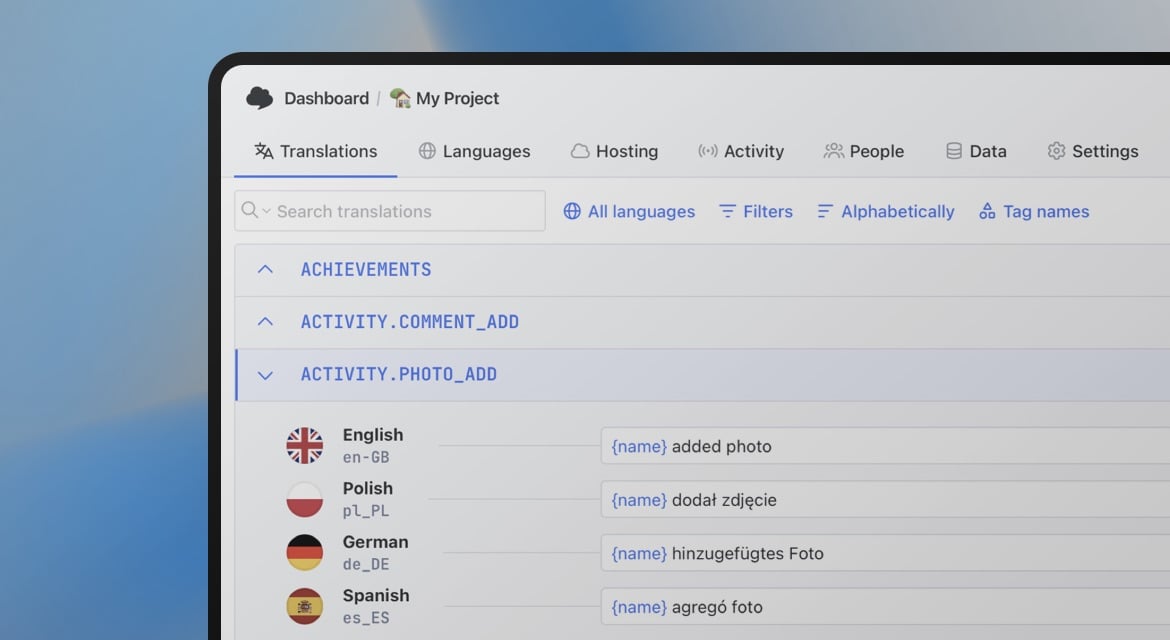
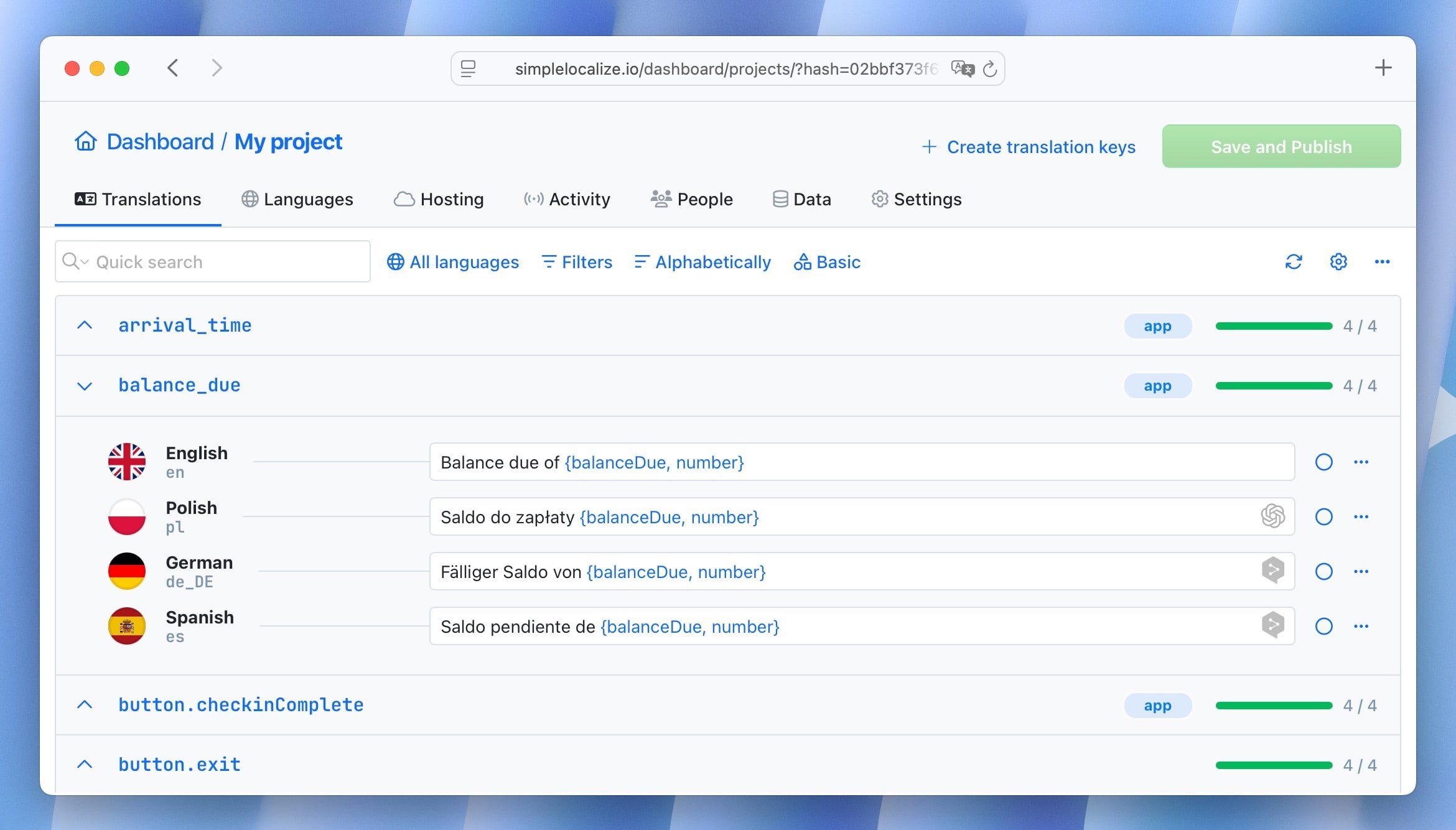
Translators and reviewers work in the online translation editor with QA checks, review statuses, AI-assist actions, and full change history. No spreadsheets, no file attachments.
Step 4: Download or host via CDN
Pull updated translations back into your repository using the CLI, or serve them directly from the SimpleLocalize CDN to decouple translation updates from your deployment cycle.
# Pull approved translations into your project
simplelocalize download
See also
- Integration guide: i18next + SimpleLocalize
- Integration guide: FormatJS + SimpleLocalize
- AI-powered localization workflows
- Continuous localization with CI/CD
Static vs. dynamic translation delivery
One often-overlooked decision is whether your translations are bundled at build time or fetched at runtime. This affects how quickly you can ship translation updates without a full redeploy.
-
Static (build-time): Libraries like
next-intl, Paraglide-JS, andtypesafe-i18ntypically load translations from JSON files bundled into the build. Every text change requires a new deployment. This is simpler and faster at runtime, but creates a bottleneck when translators need to iterate quickly. -
Dynamic (CDN/runtime): Libraries like
react-i18next(with i18next-http-backend), Tolgee, and Intlayer support fetching translations from a CDN or API at runtime. This decouples translation updates from the deployment cycle — translators can publish changes instantly without developer involvement. -
Hybrid: Many teams use a static default with a CDN override. For example,
react-i18nextwith SimpleLocalize CDN loads bundled translations at build time but can fetch updates from the CDN on page load, giving the best of both worlds.
If your team ships translations frequently or has non-developer translators, dynamic delivery (or a hybrid approach with a TMS like SimpleLocalize) will save significant time.
Migration warning: the use client pitfall
One of the most common errors developers hit when moving to the App Router is the use client directive requirement. If you import a hook-based i18n API into a Server Component without marking it as a Client Component, Next.js will throw a build error.
Libraries affected:
react-intl: All hook-based APIs (useIntl,FormattedMessage) require'use client'. Use@formatjs/intldirectly for server-side formatting.react-localization: Client-side only — no Server Component support at all.react-i18next: TheuseTranslationhook requires'use client'. Use thecreateInstancepattern for Server Components.
Libraries that work in Server Components without use client:
next-intl:getTranslations()works natively in Server Components.- Paraglide-JS: Messages are plain functions, no context or hooks needed.
typesafe-i18n: Generated functions are plain TypeScript.- LinguiJS: Compiled catalogs can be imported directly.
If you are migrating an existing app to the App Router and seeing "use client" is required errors, check whether your i18n library's API depends on React context. If it does, you either need the 'use client' directive on that component or a server-side alternative from the same library.
How to choose
Choosing the right library depends on your specific project requirements, team preferences, and future plans. Here are some general recommendations based on common scenarios:
-
New Next.js project (App Router):
Start withnext-intl. It is purpose-built for this environment, has the smallest footprint, and full RSC support without workarounds. -
New project with maximum performance requirements:
Evaluate Paraglide-JS. The tree-shaking behavior means bundle size scales with actual usage rather than total translation count. -
Existing project using react-i18next:
Stay on it unless RSC limitations are causing real friction. The ecosystem, plugins, and community are unmatched, and the upgrade path to the App Router is documented. -
React Native or Expo:
react-i18nextwithreact-native-localizeis the most battle-tested combination. -
Complex ICU formatting needs:
react-intlimplements the full ICU spec more completely than any other library and is the right choice when the formatting complexity justifies the bundle cost. -
Teams requiring strict TypeScript type safety:
typesafe-i18nfor teams that want codegen and parameter-level checking.next-intlfor Next.js teams that want key autocompletion without a separate codegen step. -
All-in-one platform with in-context editing:
Tolgee combines a React SDK with a full TMS, AI translation, and in-context editing. Ideal for teams that want a single platform instead of stitching together a library + TMS. -
AI-native, minimal setup:
Intlayer automates key discovery and CDN delivery. Good for teams that want to minimize manual translation management from day one.
We update this list as the ecosystem evolves. If you have found a library that belongs here, or a correction to any of the entries, we would like to hear from it.